听清节奏,
按自己的速度练习。Hear the rhythm.
Practice at your pace.
这是 Groove Lab 的使用说明。先学会开始、调速与开关乐器,再按需要查看设置。下方截图来自当前原生 App。
This guide helps you start, change tempo, and control instruments in Groove Lab. Explore the settings when you need them. Screenshots below come from the native app.
适用版本:1.0 (3) · 更新:2026-10-01
较早的 0.1.0 Alpha 界面可能不同,请先在 TestFlight 检查更新。
For version 1.0 (3) · Updated October 1, 2026.
Earlier 0.1.0 Alpha screens may differ. Check TestFlight for updates.
01一分钟开始Your first minute
- 测试用户先在 iPhone 或 iPad 安装 Apple 的 TestFlight,再打开你收到的邀请。请使用受邀的 Apple 帐号;本说明书不提供公开测试名额。
- 在 TestFlight 中安装或更新 Groove Lab,打开后点顶部舞种名称,选择一个伴奏。
- 先选慢速,把设备音量调到舒适大小。点开始练习,默认等待四拍预备。
- 跟随大数字和 1–8 数拍练习;需要停下时点暂停,再点继续恢复。
无需注册 App 帐号。核心声音随 App 安装,练习时无需联网。请先在安全、空旷的位置练习。
- Install Apple's TestFlight on your iPhone or iPad, then open your invitation using the invited Apple Account. This guide does not grant public beta access.
- Install or update Groove Lab in TestFlight. Open the app and tap the dance name at the top to choose an arrangement.
- Choose Slow, set a comfortable device volume, and tap Start practice. The default count-in is four beats.
- Follow the large number and the eight-count display. Tap Pause and then Continue as needed.
No app account is required. Core sounds are bundled and practice works offline. Use a safe, clear space.
02认识主画面The main screen
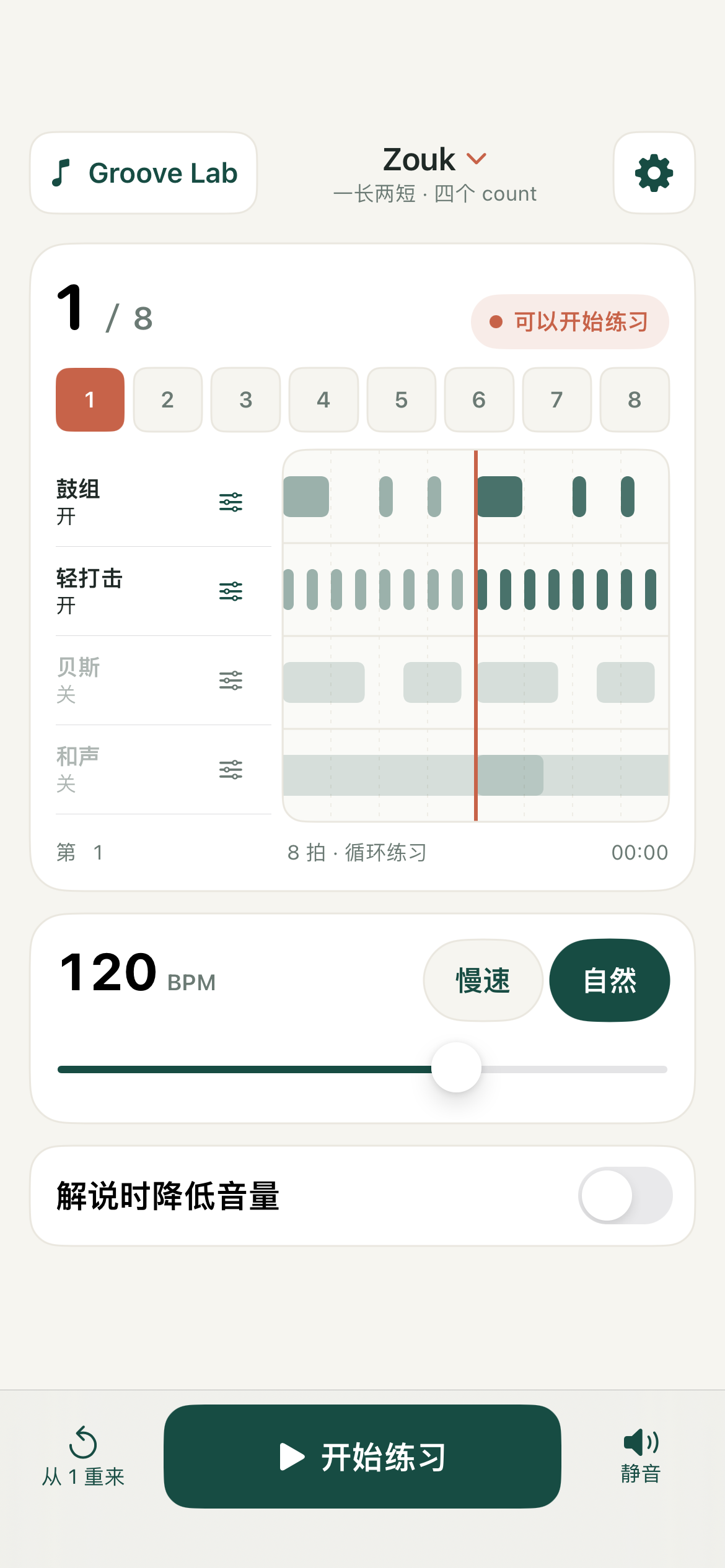
- 顶部舞种名称:切换五个练习入口。切换后停止旧伴奏并归零,再点击开始。
- 右上齿轮:打开声音、练习及语言设置。
- 大数字与八个格:显示当前 count,每个音乐拍前进一次。
- 四条音轨:音符从右向左经过中间红线。红线表示“现在”,右边即将发生,左边已经过去。灰色轨道表示关闭。
- BPM 与滑条:控制音乐速度。
- 解说时降低音量:临时压低伴奏,方便说话或示范;关闭后恢复。
- 底部播控:从 1 重来、开始/暂停/继续、静音。
播放中点“从 1 重来”会从头进入预备与播放;暂停时点它会归零并等待你开始。主画面已经移除练习笔记入口。
- Dance name: choose an arrangement. Changing it stops the previous loop and resets the position.
- Top-right gear: open sound, practice, and language settings.
- Large number and eight boxes: show the current count, advancing once per musical beat.
- Four tracks: notes move right to left across the red line. The line is now; upcoming notes are on the right. Disabled tracks appear grey.
- BPM and slider: set the music tempo.
- Lower volume to explain: temporarily lower accompaniment while talking; turn it off to restore the level.
- Bottom controls: restart at 1, start/pause/continue, and mute.
Restarting while playing starts the count-in and loop again. Restarting while paused resets the position and waits for you to start. The main screen no longer has a practice-notes entry.
03慢速、自然与自定义 BPMSlow, Natural, and custom BPM
BPM 是每分钟的音乐拍数。慢速与自然是本 App 的练习快捷值,不是舞种统一标准。点快捷键只改速度,不改变你选择的乐器与音量。
BPM means musical beats per minute. Slow and Natural are practice shortcuts in this app, not universal style standards. They change tempo only, preserving your instrument choices and volumes.
| 舞种 / Style | Slow | Natural | BPM 范围 / Range |
|---|---|---|---|
| Zouk | 100 | 120 | 80–140 |
| Salsa | 140 | 180 | 100–220 |
| Kizomba | 86 | 100 | 70–120 |
| Dominican Bachata | 110 | 130 | 90–160 |
| Sensual Bachata | 96 | 112 | 80–140 |
拖动滑条可逐 1 BPM 微调。恰好等于快捷值时,相应按钮高亮;例如 Salsa 160 BPM 时,两项都不选。这是正常状态。
播放中改变速度会暂停,并保留音乐位置。声音准备好后点“继续”。
Use the slider for one-BPM adjustments. A shortcut is selected only at its exact value. At Salsa 160 BPM, for example, neither is selected.
Changing tempo pauses playback while preserving musical position. Tap Continue once the new sound is ready.
04开关乐器与独立音量Instruments and volume
- 点击左侧乐器名称,开关该轨。关闭后不发声,时间轨变淡。
- 点乐器旁的滑条图标,打开该轨音量弹窗;拖动滑条调节,点关闭或外部返回。
- 重新开启会恢复记住的音量。关闭的轨道调音量时不会突然发声;仍需点击名称开启。
主屏“静音”关闭所有伴奏输出;“解说时降低音量”只是临时降低。设置里的“总音量”调整整体,设备音量还会再影响最终声音。
在设置里选择“稀疏 / 稍完整”或整组预设,会重新配置音层组合。只想改速度时,用主屏 Slow / Natural 或 BPM 滑条。
- Tap an instrument name to turn its track on or off. Disabled tracks are silent and dimmed.
- Tap the adjacent slider icon for a volume popup. Adjust it, then close it or tap outside.
- Turning a track back on restores its remembered level. Adjusting a disabled track does not turn it on automatically.
Mute silences all accompaniment. Lower volume to explain temporarily reduces it. Master volume in Settings controls the overall mix; device volume also affects what you hear.
Selecting Sparse / Fuller or a full preset resets the layer mix. To change tempo only, use Slow / Natural or the BPM slider on the main screen.
05五种伴奏,分别听什么What to listen for
- Brazilian Zouk
- 先听鼓组的“一长两短”:1–2 是长,3、4 是两短;5–6 / 7 / 8 重复。可轮换六款鼓音色,先单听鼓组,再加轻打击。
- Salsa
- 先听 Clave 和康加的关系。辅助牛铃便于找到脉冲,切分贝斯增加流动感;初练可先关闭它们。
- Dominican Bachata
- 听邦戈与持续 Güira 刮奏,贝斯和吉他帮助形成 Derecho 基础律动。它是固定简化练习版。
- Sensual Bachata
- 共享 Bachata 基础骨架,以平稳连续的编配练习。打击可选三款音色;贝斯、和声、旋律按需要开启。它不代表另一套独立标准鼓谱。
- Kizomba
- 当前是实验性简化编配,提供鼓组、沙锤、贝斯与电钢。可用来跟拍,但不要据此判断所有 Kizomba 子风格。
这些不是原曲播放,也不是完整音乐百科。选择帮助你听清节奏的最少声部即可。
- Brazilian Zouk
- Hear the long-short-short drum pattern: counts 1–2 form the long part, followed by 3 and 4; repeat at 5–6 / 7 / 8. Compare six drum timbres, then add light percussion.
- Salsa
- Start with clave and conga. The optional pulse bell can help you locate the beat; syncopated bass adds movement. Leave them off initially if helpful.
- Dominican Bachata
- Listen to bongo and continuous güira. Bass and guitar support a simplified, fixed Derecho-based groove.
- Sensual Bachata
- A steady arrangement built on a shared Bachata foundation. Choose from three percussion timbres and add bass, harmony, or melody as needed. It does not claim a separate standardized drum pattern.
- Kizomba
- An experimental simplified arrangement with drums, shaker, bass, and electric piano. It supports timing practice but does not represent every Kizomba substyle.
These are practice arrangements, not original-song playback or a comprehensive music course. Use the fewest parts that help you hear the rhythm.
06语言、声音与预备倒数Language, sound, and count-in
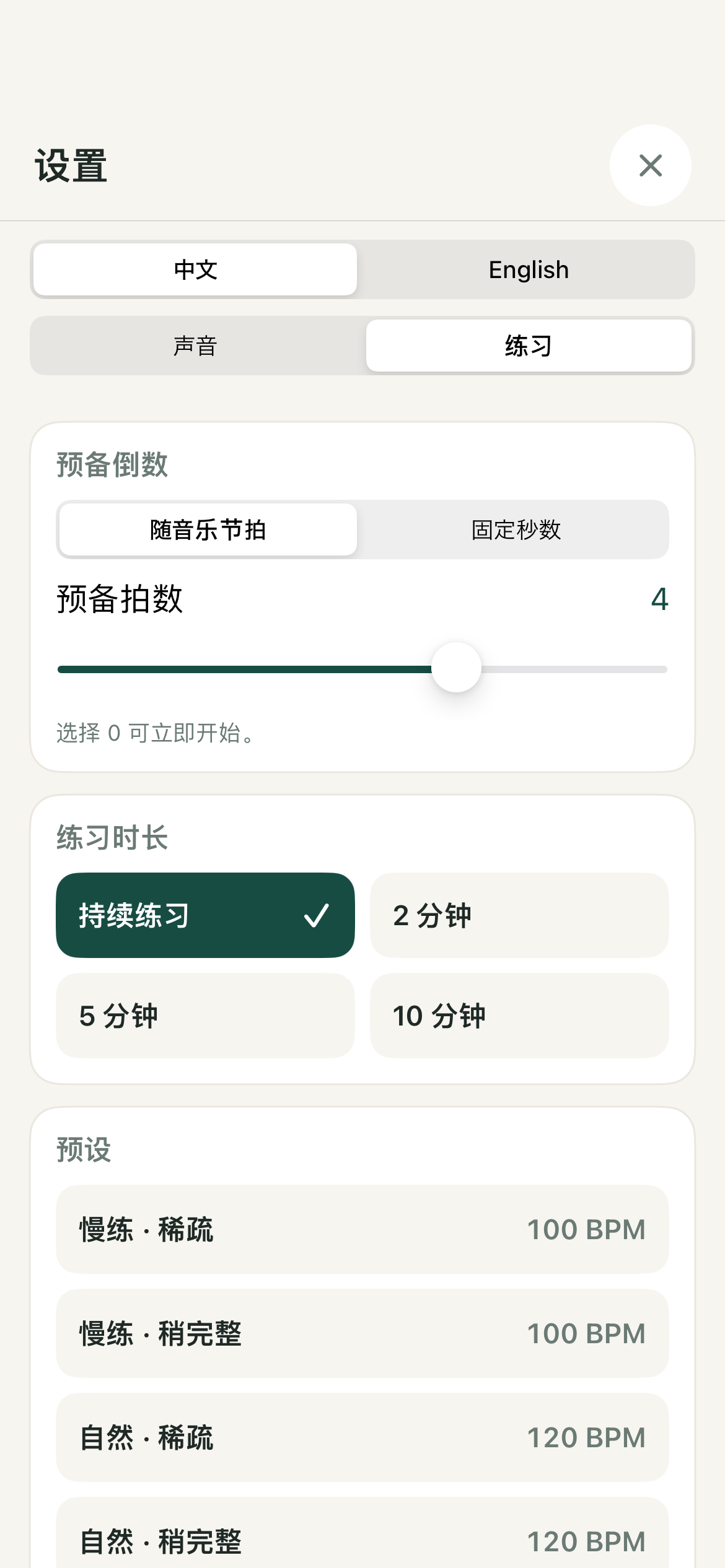
点击右上齿轮,在顶部选择中文或 English。设置分成“声音”和“练习”两个页签。
- 声音:密度、音层、可用音色和总音量。只有 Zouk 与 Sensual Bachata 有多音色选项。
- 按音乐拍预备(默认):0–6 拍,速度跟随 BPM。默认 4 拍;120 BPM 时四拍约 2 秒,100 BPM 时四拍约 2.4 秒。
- 按秒预备:0–6 秒,固定时间,不随音乐速度改变。
- 0:不倒数,直接开始。
- 练习时长:持续、2、5 或 10 分钟。定时结束后可再次开始。
- 来源与许可:查看编配说明、外部参考,或主动导出来源信息。
播放中的本次预备不会被设置变化打断;新倒数设置从下一次开始或重来时生效。
Open the top-right gear, then choose Chinese or English. Settings has Sound and Practice tabs.
- Sound: density, layers, available timbres, and master volume. Only Zouk and Sensual Bachata offer timbre choices.
- Musical beats (default): 0–6 beats at the current BPM. The default is four beats: about two seconds at 120 BPM.
- Seconds: 0–6 fixed seconds, independent of tempo.
- Zero: start without a count-in.
- Duration: continuous practice or 2, 5, or 10 minutes. Start again after a timed session ends.
- Sources and licenses: read arrangement notes, open external references, or explicitly export source information.
A changed count-in setting takes effect on the next start or restart; it does not interrupt the current count-in.
07一轮简单的跟练A simple practice routine
- 选一个熟悉的舞种与慢速,只留主要打击。
- 先听两个八拍,再开始基本步。
- 稳定后一次只加一个声部,体会它与主拍的关系。
- 想加速时暂停,调高少量 BPM,再继续。无需一定达到“自然”。
- 需要讲解时打开主屏降音量开关,说完再关闭。
练习长度和速度以舒适、稳定为准。本工具不判分、不录音,也不会判断动作是否正确。
- Choose a familiar arrangement and Slow tempo; keep the main percussion only.
- Listen for two eight-counts, then begin your basic step.
- Add one part at a time once your timing feels steady.
- Pause and increase the tempo a little if useful. You do not have to reach Natural.
- Use the main-screen volume-reduction switch while explaining, then turn it off.
Choose a comfortable duration and tempo. The app does not score, record, or assess your movement.
08离线、保存与退出Offline use, storage, and leaving the app
每种伴奏记住各自的速度、音层等设置;语言和倒数也会保存。重新打开 App 不会自动播放。没有帐号或云同步,删除 App 可能丢失本机资料。
当前版本采用前台练习:主动锁屏、切后台或音频中断时暂停。回到 App 点继续。不要把蓝牙输出的延迟误认为音轨位置错误,可换设备比较。
旧 Alpha 的笔记数据保留,但当前主画面无入口。现版不把笔记或 WAV 导出作为面向用户的主功能。外部参考页面需要网络;来源文件仅在你主动分享时离开设备。
Each arrangement remembers its own tempo and layer settings. Language and count-in preferences also persist. Reopening the app does not autoplay. There is no account or cloud sync, and deleting the app may remove local data.
This version is designed for foreground practice. Locking, backgrounding, or audio interruptions pause playback. Return and tap Continue. Bluetooth output may add latency; compare another output if timing seems delayed.
Legacy Alpha notes remain stored, but the main screen has no notes entry. Notes and WAV export are not presented as primary features in this version. External references need internet access; source files leave the device only when you explicitly share them.
09常见问题Common questions
没有声音,先看什么?
确认至少一个乐器开启、轨道与总音量高于 0、主屏没有静音、设备音量合适,并检查声音是否送到了耳机或蓝牙音箱。若已暂停,点继续;“准备声音”期间等它完成。
听不清贝斯?
先降低其他轨或单听贝斯。手机扬声器不一定能清楚表现低频,可比较耳机或音箱;不要只靠大幅提高音量来补偿。
为什么两个速度按钮都没选中?
当前 BPM 不等于该舞种的两个快捷值,这是正常的自定义速度状态。
为什么切换密度后乐器设置变了?
密度与整组预设会载入对应音层组合。只调整 BPM 不会改变乐器。
遇到声音准备错误或卡住?
使用画面上的重试;仍失败时先关闭再打开 App,不要先删除 App。把舞种、BPM、音色、设备与错误画面发给我们。
为什么我没有新版?
测试邀请和构建可用性由 TestFlight 管理。打开 TestFlight 查看版本与状态;看不到构建时联系邀请你的人。说明书上线不代表审核已批准。
No sound?
Enable at least one instrument, raise its level and master volume above zero, turn off Mute, check device volume, and confirm the selected headphone or Bluetooth output. Tap Continue if paused. Wait while the sound is being prepared.
Can't hear bass clearly?
Lower other tracks or listen to bass alone. Phone speakers may reproduce low frequencies weakly; compare headphones or a speaker rather than simply increasing the volume greatly.
Neither tempo button is selected?
Your BPM differs from both shortcut values. That is the normal custom-tempo state.
Why did my instruments change?
Density choices and full presets load a layer mix. BPM-only controls do not.
Audio preparation failed?
Use Retry if offered. If needed, close and reopen the app before considering deletion. Report the arrangement, BPM, timbre, device, and error screen.
Can't see the latest version?
TestFlight manages invitations and available builds. Check the version there or contact your inviter. A published guide does not mean Apple has approved the build.
10帮助我们改进 Alpha / BetaHelp improve the Alpha / Beta
你可以通过 TestFlight 的“发送 Beta 反馈”,或发邮件到 tntzy2000@gmail.com。最好描述一个可重复的例子;无需提供与问题无关的私人资料。
设备与系统:
耳机 / 音箱 / 手机扬声器:
舞种、BPM、音色:
打开哪些乐器及大致音量:
操作步骤:
预期结果 / 实际结果:
是否每次发生、可选截图:
听感反馈也很有用:哪里不清楚、哪个音色更舒服、是否容易跟拍。请区分“操作出错”与“希望改进的感觉”。
Use Send Beta Feedback in TestFlight or email tntzy2000@gmail.com. A reproducible example helps; avoid unrelated personal information.
Device and OS:
Headphones / speaker / phone output:
Arrangement, BPM, timbre:
Enabled instruments and approximate levels:
Steps:
Expected / actual result:
Frequency and optional screenshot:
Listening feedback is welcome too: unclear sounds, preferred timbres, or difficulty following the pulse. Distinguish a malfunction from a musical preference.